Smart plugs without a hub make it easy to automate lamps, fans, appliances, and other basic devices using your existing Wi-Fi network. The best models add dependable scheduling and voice control without requiring a separate bridge.
This roundup compares 10 popular options across compatibility, energy monitoring, electrical capacity, setup, and value so you can choose the right plug for your home.
Best 10 Smart Plugs Without a Hub Picks for 2026
Best for Energy Tracking
Tapo P115 Energy Monitoring 4-Pack

- Energy statistics and charts
- Scheduling for potential off-peak savings
- Four-plug Wi-Fi package
Best For: Monitoring and managing energy use across multiple devices
Best for Room Grouping

- Four plugs for multi-device setups
- Room grouping in the Wyze app
- Alexa and Google Assistant support
Best For: Managing several devices together in a room
Best Safety-Focused Single Plug
Kasa KP115 Energy-Monitoring Plug

- Energy monitoring in a compact plug
- Overheating and child-safety features
- Alexa and Google Assistant compatible
Best For: Monitoring one device with added safety protections
Best Matter Pick

- AiDot app can be used without a hub
- Works with major Matter platforms
- 15A/1800W two-pack with scheduling
Best For: Matter users wanting flexible hub and app options
Best Simple Setup
Kasa Smart Plug Ultra Mini EP10

- App control over 2.4GHz Wi-Fi
- Works with Alexa and Google Assistant
- Schedules and countdown timers included
Best For: Households wanting easy everyday Wi-Fi automation
Best Four-Pack Value

- Four-pack with group control
- Bluetooth and 2.4GHz Wi-Fi support
- No hub required; rated 10A/1200W
Best For: Multi-room automation on a compact budget
Best Value 4-Pack
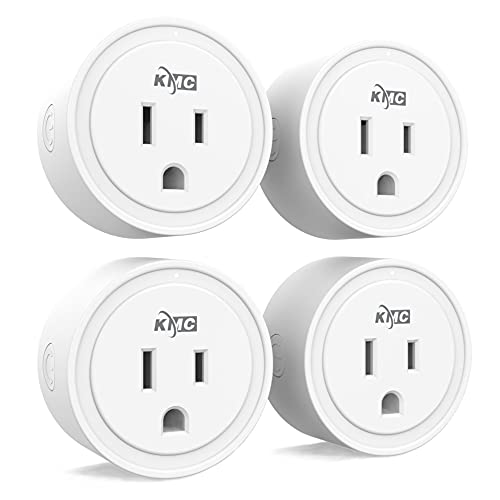
- Four-pack covers multiple devices
- Alexa and Google Assistant compatible
- Scheduling and automation in the KMC app
Best For: Automating several household devices at once
Best Compact Multi-Pack
EIGHTREE Smart Plug WiFi Outlet

- Four compact plugs for tight spaces
- Supports timers and varied schedules
- Works with Smart Life, Alexa, Google Assistant, and SmartThings
Best For: Compact multi-room automation with Smart Life
Best Single Plug
Feit Electric Smart Wi-Fi Plug

- Hub-free setup through the Feit Electric app
- Alexa and Google Home compatible
- Schedules and timers for everyday routines
Best For: Adding one compact smart plug for basic indoor automation
Best Everyday Value – Kasa Smart Plug HS103P2
The Kasa HS103P2 is a straightforward choice for shoppers looking for smart plugs without a hub. This two-pack connects directly to a 2.4GHz Wi-Fi network and adds app, voice, scheduling, and countdown control to lamps and other household electronics.
Best For: Everyday appliance control in bedrooms, living rooms, and other areas where a two-pack is useful.
Pros:
- Works with Alexa and Google Assistant for hands-free control.
- Supports remote operation, schedules, and countdown timers through the Kasa app.
- UL certified and rated for up to 15 amps resistive at 120VAC.
- Includes two plugs and a two-year warranty.
Cons:
- Requires a 2.4GHz Wi-Fi connection.
- Does not include energy monitoring.
The HS103P2 focuses on the essentials and keeps setup simple. It is a practical, hub-free option if you want dependable remote and voice control without extra monitoring features.
Best for Energy Tracking – Tapo P115 Energy Monitoring 4-Pack
For shoppers comparing smart plugs without a hub and wanting usage data, the Tapo P115 four-pack adds energy monitoring to direct Wi-Fi control. Its app provides usage statistics and charts, while schedules can help shift operation to lower-cost hours.
Best For: Households that want to monitor energy use across several connected devices.
Pros:
- Tracks energy use with statistics and intuitive charts.
- Can help estimate electricity costs and schedule devices for off-peak periods.
- Offers Alexa, Google Assistant, SmartThings, and remote app control.
- Includes smart charging and automatic shutoff features.
Cons:
- The supplied details list a four-pack, but the unit-count field lists one.
- Energy and billing features may require setup in the Tapo app or compatible systems.
The P115 stands out when energy visibility matters as much as on/off control. It is a feature-rich multi-pack for buyers who want to track consumption and automate connected devices without adding a separate hub.
Best for Room Grouping – Wyze Plug Four-Pack
The Wyze Plug four-pack is a useful pick for smart plugs without a hub when you want to manage several devices together. These 2.4GHz Wi-Fi plugs support app control, schedules, voice commands, and room grouping through the Wyze app.
Best For: Coordinating multiple lamps or appliances in one room or across a small home.
Pros:
- Four-pack provides multiple plugs for room-wide control.
- Supports Alexa and Google Assistant voice commands.
- Allows remote control and custom schedules in the Wyze app.
- Room grouping can turn multiple connected devices on or off together.
Cons:
- Requires a 2.4GHz Wi-Fi network.
- Does not list energy monitoring.
- Includes a one-year manufacturer warranty.
Wyze’s main advantage here is coordinated control rather than advanced electrical data. Choose it if grouping several devices and buying a four-pack are more important than energy tracking.
Best Safety-Focused Single Plug – Kasa KP115 Energy-Monitoring Plug
The Kasa KP115 combines hub-free Wi-Fi control with energy monitoring in a compact single-plug design. It works with Alexa and Google Assistant, supports remote operation through the Kasa app, and adds overheating protection and a fireproof shell.
Best For: Buyers who want one monitored smart plug with added safety features.
Pros:
- Provides remote and voice control through the Kasa app, Alexa, and Google Assistant.
- Includes energy monitoring for connected devices.
- Overheating protection, a fireproof shell, and a sliding child-safety cover are included.
- UL certified and backed by a two-year warranty.
Cons:
- Sold as a single plug rather than a multi-pack.
- Requires a 2.4GHz Wi-Fi connection.
- The supplied notes do not mention scheduling features.
The KP115 is a strong single-device option for shoppers prioritizing monitoring and built-in safeguards. It costs less to deploy initially than a multi-pack, but expanding to several outlets means purchasing additional units.
Best Matter Pick – Linkind Matter Smart Plug
If you want smart plugs without a hub, the Linkind Matter Smart Plug can work through the AiDot app without one. It also supports Apple Home, Alexa, Google Home, and SmartThings when paired with a compatible Matter hub or controller. The two-pack adds flexible scheduling, remote control, voice commands, and local-network operation when internet service is unavailable.
Best For: Matter users who want broad platform compatibility and the option to use the plug without a hub through the AiDot app.
Pros:
- Supports the AiDot app without a hub, while also working with major Matter platforms through a compatible controller.
- Can remain controllable over the local network during an internet outage after setup.
- Offers schedules, timers, remote access, voice control, and a compact 15A/1800W design.
Cons:
- Apple Home, Alexa, Google Home, and SmartThings require a Matter-certified hub or controller.
- Requires a 2.4GHz Wi-Fi connection and an IPv6 network.
The Linkind stands out for its Matter flexibility, especially if you want to start with app control and later add a compatible smart-home platform. Just confirm your network and controller requirements before buying.
Best Simple Setup – Kasa Smart Plug Ultra Mini EP10
For shoppers seeking smart plugs without a hub, the Kasa EP10 offers app-based control over 2.4GHz Wi-Fi without requiring a separate hub in the supplied setup details. It works with Alexa and Google Assistant, and includes scheduling, countdown timers, remote access, and a compact two-pack design.
Best For: Alexa and Google Assistant households that want straightforward Wi-Fi plug control with scheduling and remote access.
Pros:
- Simple setup through the Kasa app using a 2.4GHz Wi-Fi connection.
- Supports voice control with Amazon Alexa and Google Assistant.
- Includes schedules, countdown timers, away control, UL certification, and a two-year warranty.
Cons:
- Requires 2.4GHz Wi-Fi.
- Voice compatibility is limited to Alexa and Google Assistant in the supplied notes.
The Kasa EP10 is a practical choice if you prioritize a familiar app experience and basic automation over Matter support. Its 15A rating and compact form suit common lamps, fans, humidifiers, and seasonal lights.
Best Four-Pack Value – Govee Smart Plug
The Govee Smart Plug is a useful option for smart plugs without a hub, with the product details explicitly listing no hub required. Its four-pack supports Bluetooth or 2.4GHz Wi-Fi, Alexa and Google Assistant voice control, schedules, group management, and family sharing through the Govee Home app.
Best For: Buyers who need several compact plugs for coordinated control of lamps and other household devices.
Pros:
- Four plugs are included, with group control for managing multiple units together.
- Supports Bluetooth and Wi-Fi connections, plus Alexa and Google Assistant voice control.
- Offers schedules, app sharing, compact construction, and ETL/FCC certification.
Cons:
- Does not support 5GHz Wi-Fi.
- Rated for 10A/1200W, lower than the 15A rating of the other listed options.
The Govee is especially appealing when you want to automate several devices at once and do not need the higher power rating of a 15A plug. Check each appliance’s load before using it.
Best Value 4-Pack – KMC Smart Plug Mini
The KMC Smart Plug Mini 4-Pack is a practical choice if you need several smart plugs without a hub. It connects to a secured 2.4 GHz Wi-Fi network and supports app, Alexa, and Google Assistant control for lights and other devices.
Best For: Households automating multiple lamps, appliances, or rooms on a budget.
Pros:
- Four plugs in one pack for broader coverage.
- Works with Alexa and Google Assistant without a hub.
- Supports scheduling based on time, sunrise/sunset, weather, and device status.
- ETL certified and backed by a lifetime warranty with US-based support.
Cons:
- Requires a secured 2.4 GHz Wi-Fi network.
- Initial setup requires the KMC Smart app and an Android or iOS device.
Choose this model when the four-pack format and extensive automation options matter more than buying a single plug. Its 15A, 1875W rating suits many everyday household devices, subject to the appliance’s requirements.
Best Compact Multi-Pack – EIGHTREE Smart Plug WiFi Outlet
The EIGHTREE 4-Pack is designed for shoppers who want smart plugs without a hub and prefer a compact form. It uses Wi-Fi and the Smart Life app for remote control, schedules, timers, and voice integration with Alexa and Google Assistant.
Best For: Users who want four small plugs with flexible scheduling and Smart Life integration.
Pros:
- Compact mini-round design fits behind furniture and in tight spaces.
- Supports timers, countdowns, cycles, and random schedules.
- Works with Alexa, Google Assistant, and SmartThings after setup.
- Bluetooth-assisted discovery helps simplify initial connection in the Smart Life app.
Cons:
- Alexa and Google voice control must be linked through Smart Life; direct Alexa connection is not supported.
- Requires a phone and the Smart Life app for setup.
This is a good fit if compact sizing and a four-pack are priorities. Keep the Smart Life linking step in mind if you want voice commands, and verify that your devices stay within the 15A, 1800W rating.
Best Single Plug – Feit Electric Smart Wi-Fi Plug
The Feit Electric Smart Wi-Fi Plug is a straightforward option for adding one smart plug without a hub. It connects directly to a 2.4 GHz Wi-Fi network, allowing app or voice control of lights, fans, coffee makers, and other compatible household appliances.
Best For: Beginners who need one compact indoor plug for basic remote control and routines.
Pros:
- No separate hub is required; setup uses the Feit Electric app.
- Works with Alexa and Google Home for voice control.
- Supports customizable schedules and timers.
- Compact design is intended to fit standard indoor outlets without blocking the other socket.
Cons:
- Only supports 2.4 GHz Wi-Fi.
- Sold as a single plug rather than a multi-pack.
- Has a one-year manufacturer warranty.
Pick the Feit plug when you want a simple, single-device upgrade with remote access and routine scheduling. Its 15A, 1800W capacity is suitable for many household appliances, but check the appliance’s requirements before use.
How We Picked the Best Smart Plugs Without a Hub
We focused on Wi-Fi smart plugs that connect directly to a home router and do not require a proprietary hub for core features. Our evaluation criteria included app quality, Alexa and Google Home support, Apple Home or Matter compatibility where available, scheduling options, compact design, electrical ratings, and pack value.
We also considered useful differences between standard plugs and energy-monitoring models. A plug that reports power usage can help track appliances, identify standby consumption, or verify whether a device is running as expected. Certifications, 2.4GHz Wi-Fi support, and clear setup requirements were also important because these factors affect reliability and installation.
Quick Comparison
| Best For | What to Look For |
|---|---|
| Everyday lamps and small appliances | Reliable app control, timers, and voice compatibility |
| Tracking electricity use | Built-in energy monitoring and historical usage data |
| Apple, Google, and Alexa homes | Matter or broad platform support |
| Automating several rooms | Multipacks and simple device grouping |
| Small spaces | Ultra-mini housing that leaves nearby outlets accessible |
Key Buying Factors for Smart Plugs Without a Hub
Wi-Fi and Setup Requirements
Most hub-free plugs use 2.4GHz Wi-Fi, which generally offers better range than 5GHz for connected-home devices. Check your router and phone settings before installation, especially if your network combines both bands under one name. The manufacturer’s app is typically required for initial setup.
Platform Compatibility
Choose a plug that works with the voice assistant or smart-home platform you already use. Alexa and Google Home support is common, while Apple Home support is less universal. Matter-compatible models can offer broader cross-platform flexibility, but features may vary by controller and app.
Power Rating and Device Type
A 15A rating is common for these products, but a smart plug is not automatically suitable for every high-load appliance. Confirm the plug’s specifications before connecting heaters, air conditioners, pumps, or motor-driven equipment. Avoid exceeding the stated load and follow the manufacturer’s safety instructions.
Energy Monitoring
If you want usage data, select a model specifically advertised with energy monitoring. Basic plugs can switch power and run schedules but usually cannot show consumption. Monitoring is most useful for appliances that run frequently or have meaningful standby power draw.
Size, Controls, and Reliability
A compact design helps preserve access to neighboring outlets. Physical buttons are useful for manual control, while stable app performance and clear offline behavior matter for daily use. Look for certified products and avoid placing plugs where moisture or excessive heat is present.
Who Should Buy Which Smart Plugs Without a Hub?
Choose a standard multipack if you want affordable control for lamps, seasonal lighting, fans, or several small appliances. Select an energy-monitoring plug if electricity tracking is a priority. Matter or Apple Home-compatible options are the better fit for households building a mixed-platform smart home. If outlet space is limited, prioritize an ultra-mini design. For basic remote control at the lowest practical cost, a straightforward Alexa- or Google-compatible model is usually sufficient.