The best commercial smart locks for businesses make it easier to control entry without relying on copied keys. Keypad, RFID, fingerprint, and connected models can simplify access for employees, guests, tenants, and contractors while improving accountability.
Our selection includes light-commercial lever locks, Wi-Fi-enabled options, access-control systems, and fire-rated models. Use the guide below to match security features, installation requirements, connectivity, and operating costs to your property.
Best 10 Commercial Smart Locks for Businesses Picks for 2026
Reliable Keypad Entry
Schlage FE595 Plymouth Light Commercial Lock

- Push-button keypad for keyless entry
- Durable zinc construction
- Lifetime mechanical and finish warranty
Best For: Small businesses and light-commercial doors needing simple keypad access
Connected Access Control
Lockly Secure Pro Wi-Fi Smart Lock
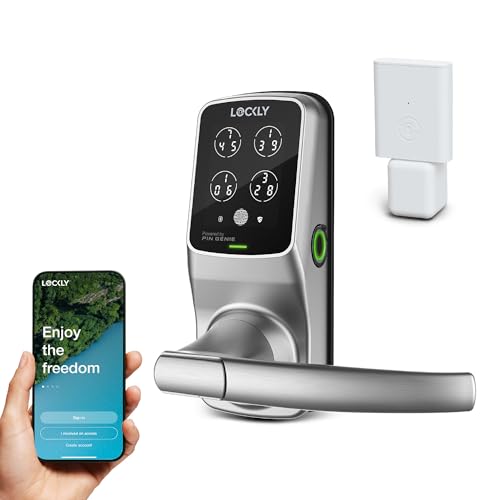
- PIN, fingerprint, app, voice, and key access
- Supports temporary and offline access codes
- Includes emergency battery backup
Best For: Businesses needing flexible credentials and remote access management
High-Traffic Keypad Value
Kwikset SmartCode 955 Light Commercial Lock

- Tested to 500,000 cycles
- Supports up to 30 user codes
- Grade 2 BHMA certified
Best For: High-traffic small-business doors and public-use areas
Built-In Wi-Fi Convenience
Schlage Encode Smart Wi-Fi Lever Lock

- Remote control through built-in Wi-Fi
- Manages up to 100 access codes
- Includes alarm and auto-lock features
Best For: Small offices and business doors needing app-based remote management
Best No-Wiring Retrofit
Hermit RFID Commercial Lever Lock

- NFC phone and keycard entry
- Offline operation with no recurring fees
- Retrofits existing doors without wiring
Best For: Small businesses, rentals, and independent hotels needing local access control
Best High-Traffic Keypad
Kwikset SmartCode 955 Kingston

- Supports 30 user codes plus one-time access
- Three-year battery life
- 500,000-cycle high-traffic testing
Best For: Offices and commercial entryways needing simple keypad access
Best for Multi-Location Management
Lockly Guard Latch Smart Lever Lock

- Centralized LocklyOS management
- Fire-rated and ADA compliant
- Fingerprint, RFID, PIN, and app access
Best For: Multi-door commercial properties needing varied credentials and remote oversight
Best with Extra Features
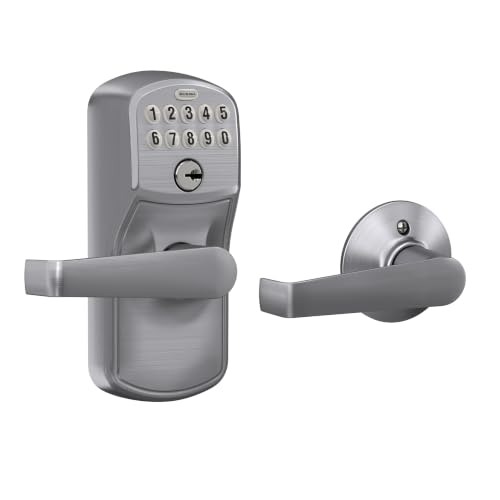
- Grade 2 metal construction
- Auto-relocks after five seconds
- DIY installation with keypad access
Best For: Small offices and light-commercial doors
Heavy-Duty Offline Control
Schlage CO-Series Commercial Lock

- ANSI Grade 1 certified
- Supports up to 500 users
- Standalone classroom and storeroom modes
Best For: Commercial classrooms, storerooms, and larger user groups
Reliable Keypad Entry – Schlage FE595 Plymouth Light Commercial Lock
For businesses seeking commercial smart locks for businesses with straightforward keypad access, the Schlage FE595 offers a practical, durable entry solution. Its push-button keypad and Flex-Lock design support keyless access while retaining a familiar lever-style format.
Best For: Small business doors, offices, and other light-commercial applications that need dependable keypad entry.
Pros:
- Simple push-button keypad operation
- Durable zinc construction with a brushed satin-chrome finish
- Lifetime mechanical and finish warranty, plus one-year electronic coverage
Cons:
- Does not list Wi-Fi, app, fingerprint, or remote-access features
- Designed for light-commercial use rather than higher-traffic commercial applications
The FE595 is a sensible choice when ease of use and durability matter more than connected smart-home controls. It keeps access management simple and installation-focused.
Connected Access Control – Lockly Secure Pro Wi-Fi Smart Lock
The Lockly Secure Pro is a feature-rich option for commercial smart locks for businesses that need multiple ways to manage entry. It combines PIN Genie keypad security, fingerprint recognition, app control, voice commands, and physical-key backup.
Best For: Businesses that want flexible access credentials, remote monitoring, temporary entry codes, and biometric access.
Pros:
- Supports PINs, up to 99 fingerprints, app control, voice commands, and physical keys
- Provides activity notifications and temporary eKeys, eBadges, and offline access codes
- Includes a 9V emergency battery port and IPX4-rated construction
Cons:
- Extended Wi-Fi functionality requires the optional Secure Link Wi-Fi hub
- Its broad feature set may be more than needed for simple keypad-only installations
With biometric access and flexible credential management, the Secure Pro suits businesses managing changing users or needing remote visibility. Buyers should account for the optional hub if they want expanded Wi-Fi functionality.
High-Traffic Keypad Value – Kwikset SmartCode 955 Light Commercial Lock
For commercial smart locks for businesses exposed to frequent daily use, the Kwikset SmartCode 955 emphasizes durability and simple code management. Its keypad supports up to 30 user codes, while its Grade 2 BHMA certification and 500,000-cycle testing suit demanding entry points.
Best For: High-traffic small-business doors, public restrooms, storage areas, and similar locations needing keypad access.
Pros:
- Tested to 500,000 cycles for high-traffic durability
- Stores up to 30 user codes plus a one-time code
- Offers Auto-Lock, Passage, and turnpiece-disable modes
- Three-year battery life and Grade 2 BHMA certification
Cons:
- Does not list Wi-Fi, smartphone app, or remote-control features
- Uses keypad codes rather than biometric access
The SmartCode 955 is a strong fit when reliability, traffic resistance, and manageable user codes are the priority. It is less suitable for businesses seeking cloud-based monitoring or app-based control.
Built-In Wi-Fi Convenience – Schlage Encode Smart Wi-Fi Lever Lock
The Schlage Encode combines a lever handle, touchscreen keypad, and built-in Wi-Fi for businesses considering commercial smart locks for businesses with remote access needs. Through the Schlage Home app, owners can manage up to 100 access codes, review lock history, and receive customizable notifications.
Best For: Small offices, rental-related business settings, and doors where remote code management and activity visibility are useful.
Pros:
- Built-in Wi-Fi enables remote locking, unlocking, monitoring, and notifications
- Manages up to 100 access codes through the Schlage Home app
- Includes an alarm, auto-lock scheduling, and Alexa and Google Assistant compatibility
- Installs with a screwdriver and fits standard door sizes
Cons:
- Its listed security certification is the highest residential BHMA rating, not a stated commercial grade
- App features depend on connection to a secure Wi-Fi network
The Encode is appealing when connected management is more important than a dedicated light-commercial rating. Its built-in Wi-Fi avoids the need for a separate hub, while the lever format keeps everyday entry familiar.
Best No-Wiring Retrofit – Hermit RFID Commercial Lever Lock
RFID Commercial Lever Door Lock, Access Control System App, Includes 2 NFC keycards (Right-Hand)
Check Price On AmazonFor businesses seeking commercial smart locks without internet dependence, the Hermit Lock offers phone-based NFC access, keycards, and app-managed users in a retrofit-friendly design. It can use existing doors and compatible master-key lock cylinders without wiring or recurring fees.
Best For: Small and medium-sized businesses, rental properties, property managers, and independent hotels that want local, NFC-based access control.
Pros:
- Unlocks with phone NFC, NFC stickers, or included keycards.
- App supports user and guest management.
- No internet connection, wiring, or recurring fees required.
- Commercial-grade retrofit design with long battery life.
Cons:
- Phone-based management uses NFC rather than remote internet access.
- Listed in a right-hand configuration.
The Hermit Lock is a practical choice when a business wants scalable access credentials while keeping the lock offline. Its main trade-off is that it is designed for local NFC interaction rather than remote control.
Best High-Traffic Keypad – Kwikset SmartCode 955 Kingston
The Kwikset SmartCode 955 is a straightforward option among commercial smart locks for businesses, using a keypad for keyless entry and supporting up to 30 user codes plus a one-time code. Its Grade 2 certification, 500,000-cycle testing, and three-year battery life suit busy entryways.
Best For: Offices, commercial buildings, and high-traffic entryways that need dependable keypad access without app or internet management.
Pros:
- Stores up to 30 user codes and one one-time code.
- Designed and tested for high-traffic use up to 500,000 cycles.
- Three-year battery life with one included 9V battery.
- Offers Auto-Lock, Passage, intrusion alert, and illuminated keypad modes.
Cons:
- Access is managed through push-button codes rather than a phone app.
- It is light commercial and Grade 2 certified, not positioned as a higher-grade commercial lock.
Choose the SmartCode 955 when easy code sharing and low maintenance matter more than remote administration. The SC1 SmartKey feature also makes it convenient to re-key to a current SC1 key.
Best for Multi-Location Management – Lockly Guard Latch Smart Lever Lock
For organizations managing multiple doors, the Lockly Guard Latch combines Wi-Fi control, LocklyOS property management, fingerprint access, RFID credentials, and keypad entry. Its fire-rated certifications, ADA compliance, and commercial-grade metal construction make it a feature-rich choice for business properties.
Best For: Commercial operators managing one or many doors across multiple buildings, especially where fire-rated door compatibility and centralized access administration are important.
Pros:
- Supports remote management, roles, credentials, and activity logs through LocklyOS.
- Fire-rated to UL10B and UL10C standards and compliant with NFPA 252 and FBC fire-door standards.
- Accepts fingerprints, RFID cards and fobs, PINs, eKeys, and eBadges.
- ADA compliant, IP54 weatherproof, and field-reversible for either handing.
Cons:
- RFID capacity of up to 999 cards and fobs requires a LocklyOS subscription.
- Battery life is listed at up to 10 months, shorter than some keypad-focused alternatives.
- Remote control requires built-in Wi-Fi plus the Secure Link Wi-Fi Hub.
The Guard Latch is the strongest fit for businesses that need credential variety and centralized oversight. It offers broad commercial functionality, but its subscription and hub requirements should be included in the operating budget.
Best with Extra Features – Schlage Camelot Lever Lock
For businesses seeking commercial smart locks for businesses without hardwiring or network setup, this Schlage keypad lever lock offers straightforward code-based access. Its auto-lock feature, illuminated buttons, and Grade 2 security make it a practical choice for residential and light commercial applications.
Best For: Small offices, light-commercial doors, and businesses wanting simple keypad access with an easy installation.
Pros:
- Automatically re-locks five seconds after a code is entered.
- Grade 2 construction with high-quality metal components.
- Illuminated, silicone-coated keypad buttons improve nighttime visibility.
- Installs with a screwdriver and includes a low-battery indicator.
Cons:
- Designed for residential and light commercial use rather than higher-security commercial installations.
- Uses a 9V battery and does not provide networked access management.
This is a dependable fit when ease of installation and predictable keypad operation matter more than centralized administration. Its limited electronics warranty is three years, while the mechanical and finish warranty is limited lifetime.
Flexible Multi-Mode Access – Keypad RFID Smart Lock
Among commercial smart locks for businesses, this model stands out for offering four entry methods: PIN, RFID fob, remote control, and physical key. It can suit offices, clinics, retail stores, and rental properties, provided the door dimensions and latch requirements match.
Best For: Small offices, clinics, retail spaces, and rentals that need several access methods instead of keypad-only entry.
Pros:
- Supports PIN codes, RFID cards, remote control, and physical keys.
- Includes four key fobs, one remote control, two metal keys, and a standard 60mm latch.
- Uses a sturdy zinc alloy lock body for everyday residential and light commercial applications.
Cons:
- Not waterproof and not recommended for direct outdoor water exposure.
- Requires a 35mm to 60mm thick door and may require drilling.
- Compatibility with commercial door configurations must be verified before purchase.
This lock offers useful flexibility for smaller operations, but fit is the key consideration. Confirm door thickness, backset, latch requirements, and indoor placement before ordering.
Heavy-Duty Offline Control – Schlage CO-Series Commercial Lock
For businesses comparing commercial smart locks for businesses, the Schlage CO-100 is the most purpose-built option here for commercial access control. It provides standalone, programmable keypad operation, supports up to 500 users, and carries ANSI Grade 1 certification for suitable classroom and storeroom applications.
Best For: Commercial classrooms, storerooms, and facilities needing offline programmable access for many authorized users.
Pros:
- Supports up to 500 users with programmable 3- to 6-digit PINs.
- ANSI Grade 1 certified and built for classroom or storeroom modes.
- Offers up to two years of AA battery life with low-battery warning.
- Operates across a wide temperature range, from -31°F to 151°F.
Cons:
- Core or cylinder is sold separately.
- Provides standalone offline control rather than a networked access solution.
- Its commercial features may be more than a very small office requires.
The CO-100 is the strongest choice for organizations that need commercial-grade credentials and substantial user capacity without the complexity of a networked system. Budget for the separately sold cylinder before installation.
How We Picked the Best Commercial Smart Locks for Businesses
We focused on locks that support practical business access needs, including keyless entry, multiple users, temporary credentials, audit-friendly controls, and dependable mechanical operation. The selection covers keypad-only models, Wi-Fi smart locks, RFID systems, fingerprint-enabled hardware, and commercial cylindrical locks.
We also considered installation style, lever-handle usability, emergency access, compatibility with existing doors, and certifications where listed. Product specifications can vary by trim, handing, software package, and seller, so confirm the current details before ordering.
Quick Comparison
| Lock type | Best for | Connectivity or credential options | Important consideration |
|---|---|---|---|
| Keypad lever | Small offices and interior business doors | PIN codes and mechanical key override | Usually requires local code management |
| Wi-Fi smart lock | Remote management and rental access | App control, codes, and remote status | Requires compatible network and batteries |
| RFID access lock | Shared offices and managed entry | Cards, fobs, or app credentials | Check credential enrollment and software support |
| Fire-rated smart lever | Rated doors requiring compliant hardware | PIN, RFID, fingerprint, or app features | Verify door, frame, and local code requirements |
| Commercial cylindrical lock | Higher-use business entrances | Keypad and commercial-grade hardware | Confirm electrified-hardware and wiring needs |
Key Buying Factors for Commercial Smart Locks for Businesses
Door and Grade Compatibility
Measure door thickness, backset, borehole, handing, and latch dimensions before buying. A light-commercial lock may suit an office or rental unit, while a busy exterior entrance may need a commercial-grade cylindrical lock. Confirm whether the product fits a mortise, cylindrical, fire-rated, or panic-hardware door.
Access Management
Choose PIN codes for simple staff access, RFID for scalable credential assignment, or Wi-Fi and app control when managers need remote changes and activity visibility. Look for unique user codes rather than one shared code, plus easy deletion when employees leave.
Power, Connectivity, and Fallback Entry
Review battery type, expected battery life, low-battery alerts, and whether the lock continues operating during an internet outage. A physical key, emergency power connection, or local keypad operation can prevent lockouts.
Security and Compliance
Prioritize tamper-resistant construction, automatic relocking, privacy functions, and appropriate certifications. For fire-rated or accessible openings, verify the complete door assembly and local requirements rather than relying on the lock description alone.
Who Should Buy Which Commercial Smart Locks for Businesses?
- Small offices: A dependable keypad lever is usually the simplest and most economical choice.
- Property managers and Airbnb hosts: Choose Wi-Fi control or flexible temporary codes for remote turnover and guest access.
- Shared workplaces: RFID or app-managed credentials make it easier to issue and revoke access without replacing keys.
- High-traffic commercial doors: Favor commercial-grade cylindrical hardware and verify compatibility with the existing door system.
- Fire-rated or accessibility-sensitive openings: Select a certified, compliant model and confirm installation requirements with a qualified professional.